Why Fast Apps Feel Instant: How Smart Data Caching Transforms Mobile UX
Discover how TanStack Query uses smart caching, background updates, and fewer repeated API requests to create smoother, more responsive mobile applications.
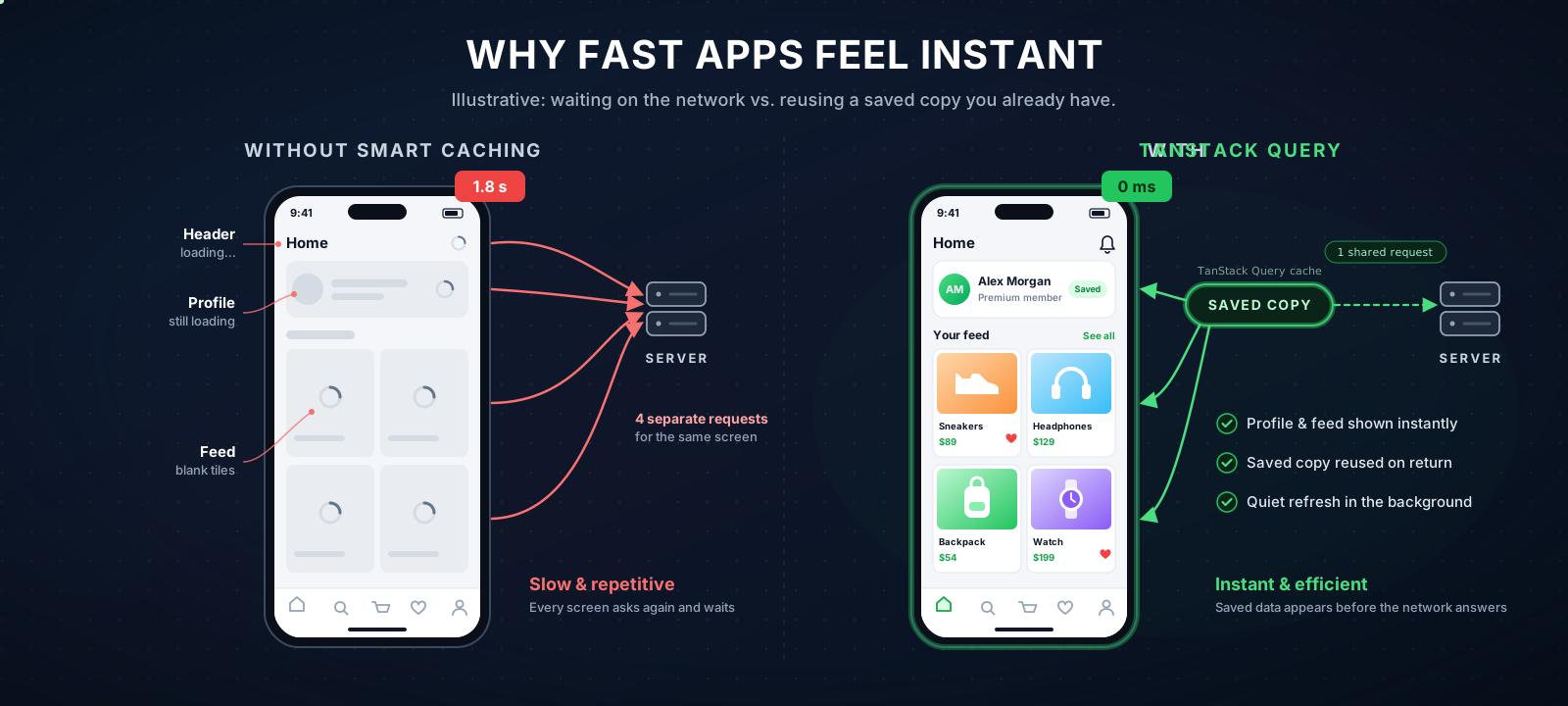
Imagine opening a shopping app. Your profile picture loads at the top, your account details appear in the menu, and your recent orders fill the middle of the screen.
If every part of that screen asks the server for your profile separately, the app does the same work four times — and when you tap a product and come back, it does it all again. The loading spinners return with it.
Now picture the same screen built differently: the app shares the information it has already fetched, reuses a saved copy, and quietly refreshes it when needed. Same screen, same server — the difference is where the data lives.
TanStack Query is the tool developers use to make that sharing happen. It's a library for React and React Native apps — the frameworks behind many of the apps on your phone — and this article explains what it changes.
Illustrative scenario
One shopping screen. Two ways of asking the server.
Each part asks separately4 requests (illustrative)
9:00Header opens and asks the server for your profile
9:00Menu and orders card ask for the same thing
9:00Settings sends a fourth identical request
9:02You come back to the screen — everything asks again; spinners return
—Every visit pays the full network cost
4Requests
SpinnersOn return
NeverData reused
With TanStack Query1 shared request (illustrative)
9:00Four parts of the screen want your profile
9:00One shared request while it loads
9:00Answer saved; all four parts fill in together
9:02You come back to the screen — the saved copy shows instantly
9:02Quietly refreshed in the background when needed
1Shared request
InstantOn return
While cachedData reused
Two Kinds of Information, Two Different Problems
Think about an app you use every day. Your selected theme, an open menu, or the text you’re typing belongs to the app itself. Your profile, recent orders, and notifications, however, come from a server.
These two kinds of information behave differently. App state reflects what the user is doing right now. Server state comes from somewhere else. It can become outdated, multiple screens may need the same information, and changes on the server can make a saved copy stale.
Without a dedicated solution, developers often manage fetching, loading states, saved copies, and refreshing separately on each screen. That means repeated requests, inconsistent data, and more code to maintain.
TanStack Query gives server data a shared place and a consistent way to manage it. Two of its core building blocks are:
useQuery — get and reuse data. Fetch information from the server, save a copy, and make it available to the screens that need it.
useMutation — change data. Send an update to the server, then refresh or update the app’s saved copy.
For example, a screen might fetch a user's profile like this:
You don’t need to understand every line to get the idea. The queryKey identifies the data, while queryFn explains how to fetch it. Here, staleTime: 60_000 means the saved copy is considered fresh for one minute.
If another screen requests the same profile using the same query key and QueryClient, TanStack Query can reuse the saved copy instead of starting from scratch. Matching queries can also share a request that’s already in progress.
For users, that can mean opening a screen with data already available instead of waiting through another loading spinner — helping an app feel faster and more responsive.
The key idea: stop making every screen fetch and manage the same data independently. Give server data a shared saved copy and a consistent way to keep it up to date.
How TanStack Query Saves the Work
Four habits do the heavy lifting. Each has a technical name, but the ideas are simple:
Share instead of repeating. When five parts of the screen want the same data at once, one request goes out and all five share the answer — and everyone reuses the saved copy until a refresh is needed. Developers call this deduplication.
Show the saved copy first, refresh it when needed. Think of a weather app showing the last forecast while it quietly checks for a new one — when a saved copy exists, the screen can show it while the request runs instead of waiting on the network. Developers call this stale-while-revalidate.
Refresh at the right moments. When the user returns to the app or the connection comes back, stale queries that are in use can refetch in the background. In React Native, those triggers need app focus and network status wired up first (via focusManager and onlineManager).
Forget gracefully. Saved copies the app isn't using anymore expire on their own — a setting called gcTime decides how long they linger (five minutes by default). This clears inactive entries over time.
Stale-while-revalidate
What happens when a screen asks for data
TanStack Query shows the last saved copy immediately, then checks for updates in the background. When a saved copy exists, users see it without waiting on the network.
A screen asks for ['user']→Check the saved copy→One of three answers
1
Saved and freshThe copy is younger than its staleTime, so it’s used right away.
9:41
ProfileCached
AM
Alex MorganPremium member
Your accountOrders 4MessagesSettings
0 msScreen shows saved data instantly
No requestData is still fresh
DoneNothing else to load
0 requestsThe saved copy is reused as-is.
2
Saved but out of dateThe saved copy shows right away while a quiet refresh checks for updates.
9:41
ProfileSaved copyRefreshingUpdated
AM
Alex MorganPremium member
Your accountOrders 34MessagesSettings
0 msSaved data shows (slightly old)
Background requestChecks for updates
~300 msNew data updates the screen
1 requestNo waiting for the saved copy — this is stale-while-revalidate.
3
Not saved yetOn a first visit, the app makes a request and shows a loading state.
9:41
ProfileLoadingFetchingLive
AM
Alex MorganPremium member
Your accountOrders 4MessagesSettings
0 msScreen shows a loading state
Network requestOne request fetches the data
~300 msData arrives and fills the screen
1 requestShared by every screen asking at the same time (deduplication).
How long a copy counts as freshSet per resource with staleTime.
When unused copies disappearCopies no screen is using expire after gcTime.
None of this makes the server faster — it makes the app ask fewer questions it already knows the answer to. Fewer requests, because identical ones are shared. Fewer spinners, because saved data shows before the network answers. And less code, because much of the bookkeeping that used to cause bugs moves into the library. On mobile — where connections drop, screens change constantly, and users leave and return all day — those savings add up quickly.
TanStack Query doesn't make your API faster. It stops your app from asking the server questions it already knows the answer to.
Where It Pays for Itself
Four everyday features cover most of the difference a user can feel.
Search and autocomplete
Search is demanding because every keystroke could be a request — and networks answer out of order, so a slow response to "hel" can arrive after the response to "helm" and overwrite it.
The manual version
Wait for the user to pause typing, track which request is newest so slow answers can't overwrite fast ones, and manage the flicker between keystrokes.
With TanStack Query
The search term is the label. Each debounced term that gets fetched has its own saved copy, superseded requests are cancelled when the fetcher uses the provided signal, and backspacing to an earlier term can reuse results still in the cache. Debouncing is still yours to add.
const { data } = useQuery({
  queryKey: ['search', debouncedTerm],
  queryFn: ({ signal }) => api.search(debouncedTerm, { signal }),
  enabled: debouncedTerm.length > 1,
  placeholderData: keepPreviousData, // no flicker between keystrokes
});
Two details do the work. The previous results stay on screen while the next ones load — the dropdown doesn't collapse into a spinner between keystrokes. And when the fetcher passes the signal through to the underlying HTTP request (such as fetch or a compatible Axios call), outdated calls are cancelled — avoiding unnecessary work — while the labels keep every result attached to the search that produced it.
Requests that depend on each other
Some screens need answers in order: who is this user → what are they allowed to see → show that content. Written by hand, that's a fragile chain of waits. With TanStack Query, each step simply declares what it's waiting for (enabled), and each step is saved independently — so returning to the screen mid-chain doesn't start over.
Endless feeds that load more as you scroll are easy to get subtly wrong — merging pages, tracking cursors, removing duplicates. TanStack Query handles the pages and cursors (removing duplicate items across pages is still up to the app) and keeps the whole paginated structure as one saved object: pages it still holds can be reused without fetching them again, and when the feed refreshes, the loaded pages are refetched in order, one after another. Keeping the scroll position is up to the app's list component, not the cache.
A like button that waits for the server feels broken. One that responds instantly and sorts out the truth later feels fast — and TanStack Query makes optimistic updates easier to manage. You still handle failed requests, concurrent changes, and rollback logic yourself. The trick: keep a snapshot of the saved copy, update the screen immediately, undo if the call fails, then quietly confirm with the server.
Optimistic updates, in plain terms
One tap on a like button, start to finish
0141You tap likeThe post has 41 likes
→
0242Screen updates instantlyA snapshot of “41” is kept, just in case
→
0342Server is askedThe user has already moved on
→
42
SuccessKeep it, then quietly resync the feed
41
FailureRestore the snapshot — back to 41
Updating before the answer arrives is a bet the call succeeds. If the request fails, the app can restore the previous saved copy and then reconcile it with the server when connectivity allows.
The same pattern covers follows, cart badges, and comment counts — every high-frequency tap where a spinner would be insulting. This matters doubly on mobile, where connections are flaky: the user sees instant feedback, and the library gives you the hooks to roll back cleanly when the network doesn't cooperate.
What We Would Decide Differently Today
Decide how fresh each kind of data needs to be — a sensible default, then tune per resource. A profile and a live feed have different freshness needs; a single setting for everything tends to over-fetch or under-freshen something.
Design the labels like a contract. Centralized, deliberate query keys keep refreshes surgical — every over-broad refresh is a request the app didn't need to make.
Update the screen before the server answers only where undoing is cheap. A like can roll back cleanly; a payment cannot. Instant-feeling is a UX tool, not a default.
Keep app-owned information out of the shared shelf. Theme, open menus, form drafts — they belong elsewhere. Mixing them re-creates the problem this solves.
Frequently Asked Questions
Does TanStack Query replace app state tools like Redux?
For server-provided data, yes — and that's often a large share of what ends up in those tools. What remains is the app-owned kind (open menus, form drafts, preferences), which a small store still handles well. The common outcome is a much smaller store, not a deleted one.
How long should saved data be trusted?
That window is called staleTime. The default is zero: cached data is considered stale immediately, so it becomes eligible for a background refetch on triggers such as a component mounting, the app regaining focus, or the network reconnecting — correct but conservative. Reference data can be trusted for minutes; feeds for tens of seconds; truly live data belongs on a polling interval. Start with a sensible default, then tune per label. Note that staleTime only controls freshness — how long inactive data stays in the cache is a separate setting, gcTime, and stale data can still be shown while a refetch runs.
Does TanStack Query work in React Native?
Yes. TanStack Query works with React Native and can help apps reuse previously fetched data, reduce unnecessary requests, and refresh information when needed. Developers can also connect it to app lifecycle and network connectivity events so data can refresh when users return to the app or reconnect. For apps that need to retain data across restarts or support offline actions, additional persistence and offline-handling logic may be required.
At Green Platform Solutions, we use these patterns to build more maintainable data-fetching systems for mobile applications.
Final Thoughts
Fast apps aren't fast because their servers answer quicker — they're fast because they avoid asking questions they already know the answer to. Sharing instead of repeating, showing saved data first, updating the screen before the network confirms: none of it is magic, but all of it has to be built deliberately. TanStack Query is how we build it once, consistently, for every screen.
Minal Verma is a React Native Developer at Green Platform Solutions, building production mobile applications for businesses. This article reflects patterns used across multiple production projects to make apps feel faster and keep their data-fetching code maintainable.
Ready to Transform Your Business with AI?
Get expert guidance on implementing AI solutions that actually work. Our team will help you design, build, and deploy custom automation tailored to your business needs.
We use analytics cookies to understand how the site is used. You can accept or decline —
essential functionality works either way. See our
Privacy Policy.